
Top Declining Keywords
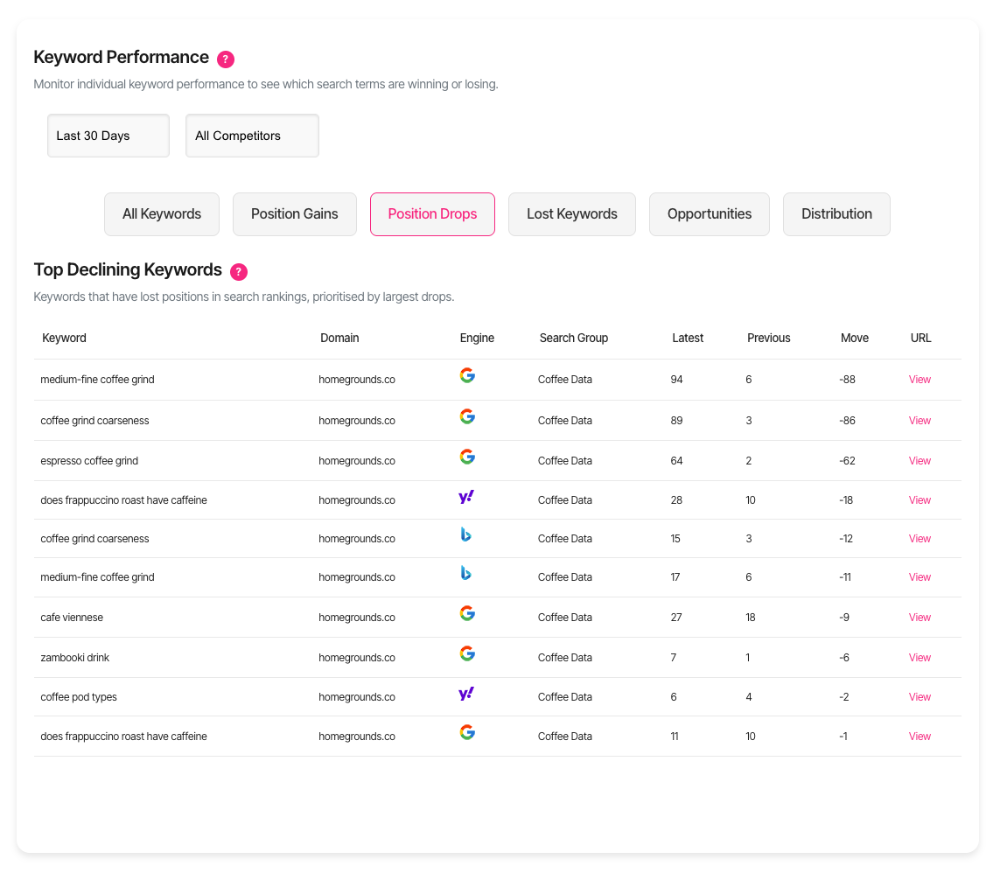
Declining keywords are search terms where your ranking position dropped. The system compares your current position to your previous check and identifies keywords that moved down.
These declines matter. They signal content that's losing ground to competitors or falling out of Google's favour.
Why monitor declines?
Catching ranking drops early lets you respond quickly. You'll spot problems before they cost serious traffic. Declines reveal opportunities too. A small drop might need minor tweaks. A major fall demands immediate attention and a fresh content approach.
Find declining keywords
Navigate to the Keywords dashboard. Look for the Declining Keywords tab. Click the tab to load your decline data. The system shows your top 10 worst-performing keywords based on the latest check.
Read the table
Each row represents one keyword that dropped in rankings. Here's what you'll see:
Keyword — The search term that declined.
Domain — Which of your websites lost position.
Engine — The search engine where the drop occurred (Google, Bing, or Yahoo).
Search Group — The keyword set this term belongs to.
Latest — Your current ranking position.
Previous — Where you ranked in the last check.
Move — How many positions you dropped (shown as a negative number).
URL — A link to view the ranking page.
Understand the decline numbers
The Move column shows drops as negative numbers. A -5 means you fell five positions.
Larger negative numbers represent bigger problems. A -20 drop demands immediate investigation. A -2 drop might reflect normal ranking fluctuations.
Filter by search group
Use your search group dropdown to focus on specific domain sets. This narrows the view to keywords you're actively managing. Different search groups often have different priorities. Filter strategically to match your current project focus.
Interpret ranking positions
Positions 1-10 put you on page one. Drops here hurt traffic significantly. Every position matters when you're this high.
Positions 11-20 keep you visible on page two. You're close to page-one traffic. Small improvements can yield big gains.
Positions 21-100 mean limited visibility. Drops here matter less immediately, but they show downward trends worth monitoring.
Position 1000 appears when you've dropped out of trackable results entirely. This signals serious content or technical problems.
Prioritise your response
Biggest drops first
Sort mentally by the Move column. The largest negative numbers need urgent attention. These represent the most dramatic ranking losses.
High-value keywords
Combine decline size with keyword importance. A -3 drop on your highest-volume keyword matters more than a -10 drop on a tiny-volume term.
Page-one losses
Keywords that dropped off page one deserve immediate action. You're losing prime visibility and traffic.
Pattern recognition
Multiple keywords declining together suggest systemic issues. Look for common themes like topic, content age, or domain.
Common decline causes
Content freshness
Older content naturally loses rankings as competitors publish updated material. Refresh your content with current information and examples.
Competitor improvements
Other sites might have enhanced their content. Check who outranks you now and identify what they're doing differently.
Technical issues
Site speed problems, broken links, or mobile usability issues can trigger drops. Run technical audits when you see widespread declines.
Algorithm updates
Google's algorithm changes affect rankings. Check SEO news sources when multiple keywords drop simultaneously.
Search intent shifts
What users want from a search term can evolve. Your content might not match current intent anymore.
Take action on declines
Content audit
Visit your ranking URL. Read it critically. Compare it to pages that now outrank you. Identify gaps in depth, freshness, or user value. These gaps explain the decline.
Content updates
Add new sections covering recent developments. Update statistics and examples. Expand thin areas where competitors provide more detail.
On-page optimisation
Revisit title tags and meta descriptions. Ensure they clearly match search intent for the declining keyword. Check heading structure. Make sure your H1 and H2 tags include relevant keyword variations.
Technical fixes
Verify your page loads quickly. Test mobile usability. Confirm internal links work properly. These technical factors influence rankings alongside content quality.
New content
Sometimes refreshing won't work. The page might target the wrong intent or cover the topic inadequately. Create new content that better serves current search needs. Redirect the old URL when the new page ranks.
Track your fixes
After you update content or fix technical issues, check the keyword again. You'll see whether your changes recovered the lost positions. Recovery isn't instant. Rankings can take days or weeks to respond to improvements. Monitor consistently.
When declines don't appear
If the table shows "No declining keywords", you've avoided ranking drops since your last check. That's good news. This also means you need recent data. Check keywords regularly to populate the decline tracker.
Search engine icons
The Engine column displays recognisable search engine logos. This visual indicator helps you quickly identify where problems exist. Different engines have different algorithms. A Google decline might not appear on Bing, and vice versa.
Data timeframe
The system compares your two most recent keyword checks. Current position comes from your latest check. Previous position comes from the check before that.
Limits and scope
The table displays your 10 largest declines. This focuses attention on your worst performers. Only keywords ranking below position 100 appear. If a keyword drops beyond trackable range, it won't show in this view.
Get support
Need help understanding a specific decline pattern? Contact our support team through the help icon. We'll help you diagnose causes and plan recovery strategies.