
AI Conversation Responses
Monitor how AI platforms mention and position your company when answering buyer journey questions—and take action to improve visibility.
Quick start
1. Select a Project from the dropdown
2. Click a configuration group to expand conversations
3. Select a conversation to view response history
4. Click Analyse with AI for insights and recommendations
5. Add priority actions to Kanban for tracking
Understanding the display
The dashboard has two views: a list view showing all conversations grouped by configuration, and a detail view showing response history for a single conversation.
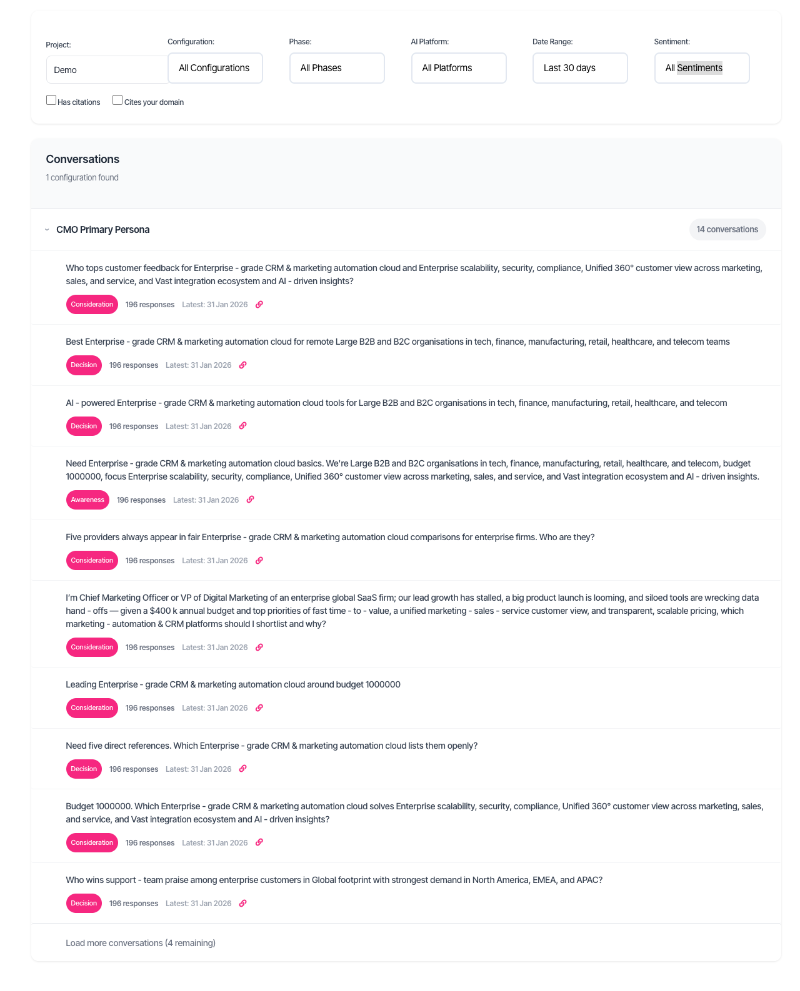
Each conversation card displays:
| Element | Meaning |
| Question text | The buyer journey question being tracked |
| Phase badge | Buyer journey stage (Awareness, Consideration, Decision) |
| Response count | Total responses collected across all platforms |
| Latest date | Most recent response collection date |
| Link icon | Indicates your domain was cited in at least one response |
Detail view
Click any conversation to see its full response history. Responses are grouped by date, with each date showing results from all AI platforms queried that day.
Each response card shows:
| Element | Meaning |
| Platform name | AI platform (ChatGPT, Claude, Gemini, or web-enabled variants) |
| Sentiment badge | AI's tone about your company (Positive, Mixed, Negative, Unknown) |
| Source count | Number of web sources or citations referenced |
| Response text | Full AI response content |
| Web sources | Numbered references the AI cited (for web-enabled platforms) |
| Citations | Specific URLs and snippets referenced |
What should I do next?
Response patterns reveal where to focus optimisation efforts:
| Pattern | Status | Action |
| High visibility, positive sentiment | Strong performance | Maintain current content strategy. Monitor for changes. |
| Low visibility across platforms | Needs attention | Run AI Analysis to identify content gaps. Focus on factual density. |
| Mentioned but negative sentiment | Reputation risk | Review AI claims against your key items. Correct inaccuracies on your site. |
| Competitors consistently cited | Competitive gap | Analyse competitor pages being cited. Add similar proof points to your content. |
| Your domain cited frequently | Good citation authority | Strengthen cited pages with additional evidence and freshness signals. |
| Mixed results across platforms | Inconsistent positioning | Identify which platforms underperform. Tailor content to their citation preferences. |
Using the filters

Project
Select the project containing your buyer configurations. Each project groups related configurations for a specific domain or business unit.
Configuration
Filter to a specific buyer configuration. Configurations define the target profile (industry, persona, company size) that shapes the tracked questions.
Phase
| Phase | Question focus |
| Awareness | Problem discovery and initial research questions |
| Consideration | Solution comparison and vendor evaluation questions |
| Decision | Final selection and implementation questions |
AI Platform
| Platform | Description |
| ChatGPT | OpenAI's model (knowledge-based responses) |
| Claude | Anthropic's model (knowledge-based responses) |
| Gemini | Google's model (knowledge-based responses) |
| Perplexity | Perplexity's model (knowledge-based responses) |
| ChatGPT + Web | ChatGPT with live web search enabled |
| Gemini + Web | Gemini with Google Search grounding |
| Perplexity + Web | Perplexity with live web search enabled |
Date range
| Option | Best for |
| Last 7 days | Recent performance check |
| Last 30 days | Trend analysis (default) |
| Last 90 days | Quarterly review |
| Last 6 months | Medium-term patterns |
| Last year | Long-term trends |
| All time | Complete history |
Sentiment
Filter by how AI platforms describe your company:
| Sentiment | Meaning |
| Positive | Favourable language, recommendations, or endorsements |
| Mixed | Balanced mention with both strengths and limitations |
| Negative | Critical language, concerns, or unfavourable comparisons |
| Unknown | Sentiment not determined or company not mentioned |
Citation filters
| Filter | Shows conversations where |
| Has citations | At least one response includes source citations |
| Cites your domain | Your company's website was specifically cited as a source |
Using AI Analysis
AI Analysis examines response patterns, validates claims against your key items, and identifies specific actions to improve AI visibility.
Running an analysis
1. Open the detail view for any conversation
2. Click Analyse with AI
3. Wait for processing (typically 30–60 seconds)
4. Review results in the expandable analysis panel
What the analysis delivers
Summary — A one-line overview plus the biggest issue and opportunity identified.
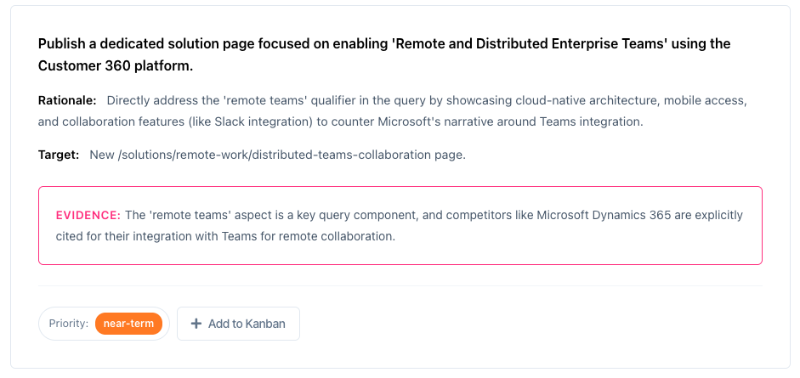
Recommended actions — Prioritised tasks with rationale, target page, and evidence from the data:
| Priority | Timeframe |
| Immediate | Address within 1–2 weeks (factual errors, competitive threats) |
| Near-term | Address within 1–2 months (content gaps, positioning issues) |
| Can-wait | Address when time permits (optimisation opportunities) |
Performance snapshot — Key metrics calculated from collected responses:
| Metric | Description |
| Visibility | Percentage of responses mentioning your company |
| Win rate | Percentage of responses ranking you first |
| Average rank | Mean position when mentioned |
| Citation rate | Percentage of mentions including a citation to your site |
Claims analysis — AI statements about your company, categorised by accuracy:
| Category | Meaning |
| Validated | Claims matching your key items (source of truth) |
| Inaccurate | Claims contradicting your key items |
| Unvalidated | Claims with no matching key item (may be true or false) |
| Missing | Key items not mentioned by AI platforms |
| Patterns | Recurring themes across responses |
Perception analysis — How AI describes your company versus competitors:
| Dimension | Values |
| Tone | Confident, Neutral, Cautious, Sceptical |
| Sentiment | Positive, Neutral, Negative |
Citation analysis — Details about which pages get cited and why:
| Section | Content |
| Your pages | URLs cited, frequency, and why they work |
| Competitor pages | What competitors have that earns citations |
| Content gaps | Specific evidence or information to add |
Adding actions to Kanban
5. Find a recommended action in the analysis results
6. Click + Add to Kanban
7. Select the target project board
8. Task creates with action details pre-filled
Troubleshooting
No conversations found
Filters may be too restrictive. Try selecting All Projects or expanding the date range. Verify buyer configurations exist with active tracking.
No competitor data
Competitor tracking may not be enabled for this configuration, or competitors aren't ranking for tracked questions. AI Analysis still works without competitor data—it focuses on absolute improvements.
Sentiment shows as Unknown
Your company wasn't mentioned in the response, so sentiment cannot be determined. Low visibility is the underlying issue.
AI Analysis takes too long
Large datasets with many responses can slow processing. Try filtering to a specific platform or shorter date range before running analysis.
AI Analysis failed
Temporary processing issue. Wait a moment and retry. If the problem persists, some cited pages may be inaccessible for content analysis.
Cited pages show no content
Some websites block automated access. The analysis proceeds with available data, noting where content couldn't be retrieved.
FAQ
How often are responses collected?
Response collection frequency depends on account configuration. Typically, each conversation is checked daily or weekly across all enabled platforms.
Why do results differ between AI platforms?
Each platform uses different training data, retrieval methods, and ranking algorithms. Variation is expected and indicates different optimisation opportunities.
What are key items?
Key items are facts about your product or company stored in your buyer configuration. AI Analysis validates claims against these items to identify accurate versus inaccurate statements.
Why is my company not mentioned?
AI platforms surface companies based on training data, web presence, and relevance to the query. Low visibility indicates content gaps or insufficient authoritative information online.
How does the sentiment filter work?
Sentiment filters to responses where YOUR company received that sentiment classification. It doesn't filter by overall response sentiment or competitor sentiment.
What makes a page citable?
AI platforms tend to cite pages with specific facts, statistics, named entities, third-party validation, clear structure, and direct relevance to the query. Generic marketing content rarely gets cited.
Getting help
Contact support for specific data issues or configuration questions