
Top Cited Pages
Top Cited Pages shows which URLs are most frequently cited by AI platforms. This reveals the actual content sources AI systems reference when discussing brands—whether your pages, competitor pages, or third-party sources. Pages from your brand are highlighted with a badge.
Quick start
1. Select 30 Days and the target Project
2. Review the top 10 most-cited pages ranked by citation count
3. Use Scope to filter to your brand's pages
4. Click any URL to visit the cited page
Understanding the display
Each row represents a URL that AI platforms have cited as a source. The display shows the page URL, domain, how many conversations cited it, and which platforms provided the citations.
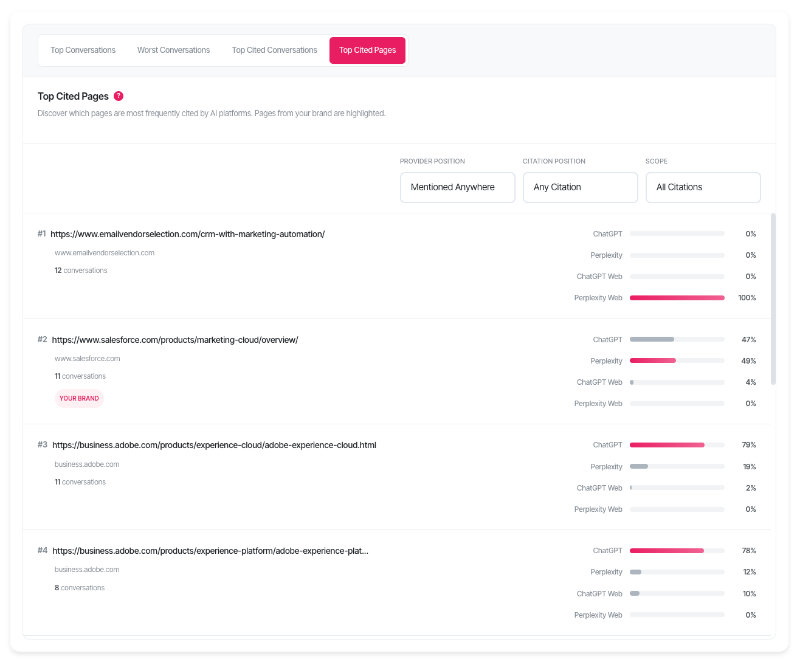
Row structure
| Element | Description |
| Rank number | Position in the top 10 (#1, #2, etc.) based on total citations |
| URL link | Clickable link to the cited page (opens in new tab) |
| Domain | The website domain extracted from the URL |
| Conversations count | Number of unique conversations that cited this page |
| Your Brand badge | Appears when the URL belongs to your configured brand domains |
| Platform bars | Citation share percentage per platform |
| Winner highlight | The platform with highest citation share is highlighted |
Citation share
The percentage shown for each platform represents that platform's share of total citations for the page. If a URL has 20 citations total and Perplexity provided 14 of them, Perplexity shows 70%.
Your Brand badge
Pages from your brand's domains are automatically detected and marked with a "Your Brand" badge. This uses domain matching against your configured brand names in AI Visibility Settings.
What should I do next?
Top cited pages reveal content authority and competitive positioning:
| Pattern | Action |
| Your pages in top 10 | Strong content authority. AI platforms trust your content as a source. |
| Competitor pages dominate | Competitors have more authoritative content. Analyse what they cover. |
| Third-party sites dominate | Industry publications or review sites are trusted. Consider partnerships or PR. |
| One page cited repeatedly | This is your most authoritative content. Create similar content. |
| No brand pages appear | AI doesn't cite your content as a source. Improve content depth and authority. |
| Technical docs cited | Your documentation is authoritative. Expand technical content. |
Using the filters
Scope
The Scope filter controls which citations are included:
| Option | Shows |
| All Citations (default) | All cited pages regardless of brand—competitors, third parties, everyone |
| Your Brand Mentions | Citations from AI responses that mentioned your brand |
| Your Brand URLs | Only pages from your brand's domains |
Use "All Citations" to see the competitive landscape. Use "Your Brand URLs" to see which of your pages AI platforms cite most.
Provider Position
Filter by where brands appeared in AI responses:
| Option | Shows citations from responses where |
| Mentioned Anywhere (default) | Any brand was mentioned anywhere |
| Top 3 Recommendations | A brand was in the top 3 recommendations |
| #1 Recommendation | A brand was the top recommendation |
Citation Position
Filter by citation prominence:
| Option | Counts |
| Any Citation (default) | All citations regardless of position |
| Top 3 Citations | Only citations ranked 1–3 in the response |
| Primary Citation | Only the first/primary citation |
Date range
| Option | Best for |
| Yesterday | Latest citation patterns |
| 7 Days | Recent page performance |
| 30 Days | Trend analysis (default) |
| 90 Days | Quarterly content review |
| 180 Days | Long-term authority analysis |
Platform
Filter to citations from a specific AI platform. Perplexity typically generates far more citations than other platforms due to its search-engine architecture.
Reading the results
Ranking logic
Pages are ranked by total citations (highest first), then by unique conversations count. The top 10 most-cited pages appear in the table.
Conversations count
The conversations count shows how many different questions led to this page being cited. A page cited in 15 conversations has broader relevance than one cited 15 times in a single conversation.
Troubleshooting
No cited pages found
The "No Cited Pages Found" message indicates no citation data matches the current filters.
• Expand the date range to capture more data
• Set Scope to "All Citations" to see all cited pages
• Set Citation Position to "Any Citation"
No brand pages appear
If "Your Brand URLs" shows no results but "All Citations" shows data:
• AI platforms cite other sources for your topics—competitor or third-party content
• Your content may lack the depth or authority AI systems look for
• Verify brand names are configured correctly in AI Visibility Settings
FAQ
What determines the top 10 ranking?
Pages are ranked by total citations (highest first), then by unique conversations count as a tiebreaker.
What's the difference between "Your Brand Mentions" and "Your Brand URLs"?
"Your Brand Mentions" shows citations from responses that mentioned your brand—the sources AI used when discussing you. "Your Brand URLs" shows only pages from your own website domains.
Why do citation counts vary across platforms?
Each platform has different citation behaviour based on its architecture and query type. Compare trends within the same platform over time rather than across platforms.
How is "Your Brand" detected for URLs?
The system matches URL domains against your configured brand names using substring matching. If your brand is "Acme Corp", URLs from acmecorp.com would be tagged as "Your Brand".
What's the difference between this and Top Cited Conversations?
Top Cited Conversations shows which questions generate citations. Top Cited Pages shows which URLs get cited—the actual content sources AI platforms reference.
Can I see which conversations cited a specific page?
The conversations count shows how many conversations cited the page. To see specific conversations, use AI Conversation Responses to browse responses that include citations.
Getting help
Contact support for data issues or unexpected patterns